Sunday, 16 February 2020

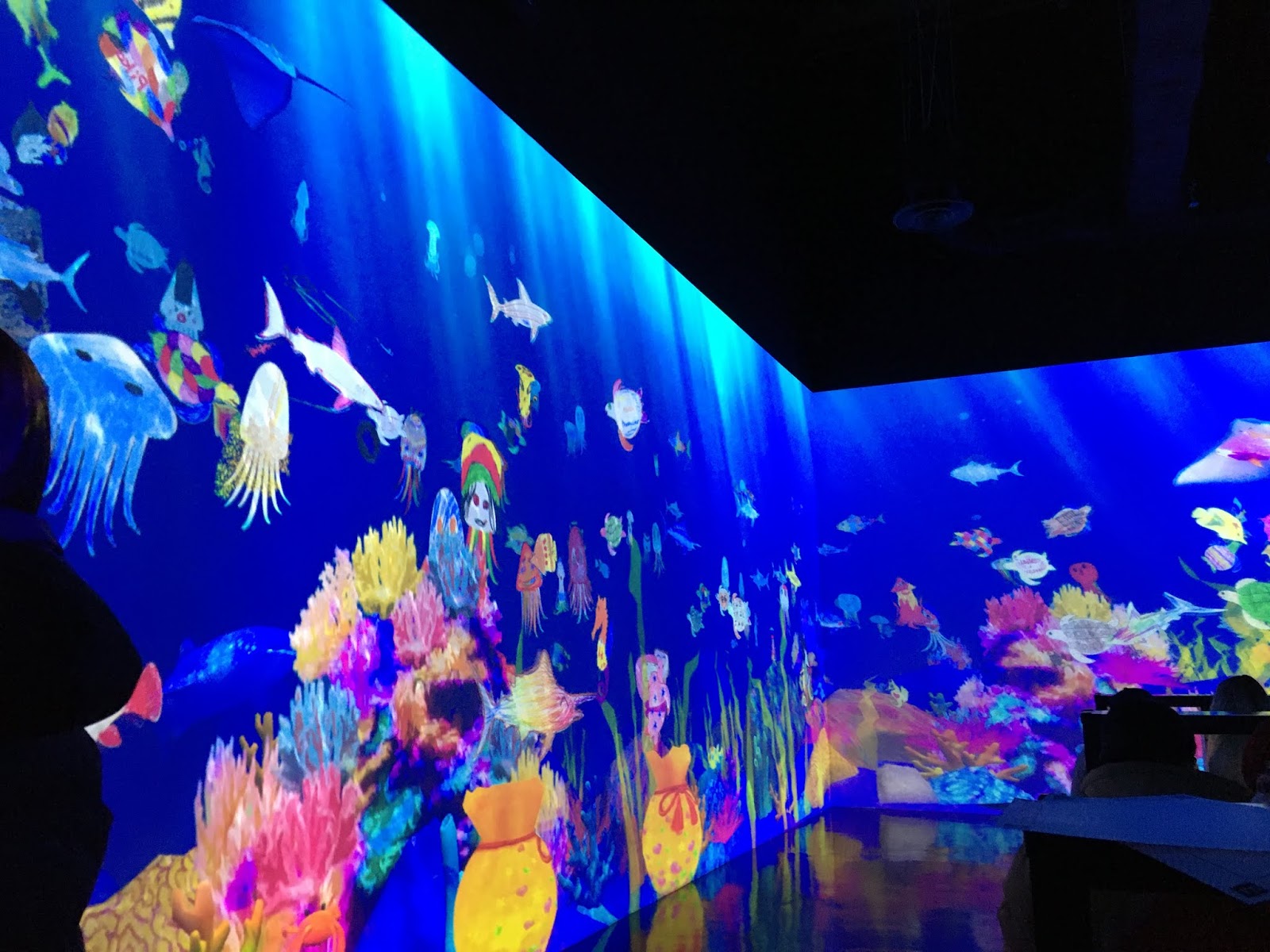
Mori Digital Art Museum

There is one installtion which needs to go on to the 100 thinhs you need to see before....., bucket list.

The Mori Digital Art Museum in Japan. Actually, not really a museum. More like a theme park with entertainment, activity, interactivity and immersion.

With more than 400 projectors. Blending by VNS Geobox and creative input by the visitors....not to be missed.
If you have a change to go, fly to or via Tokyo, take the day, you will not regret it.
The site can be reached in less then one hour from Haneda Airport.


Projection over wall recess

Projection over posts or wall recesses.

This is a common problem and caused by the different projection distance. How to solve it?

Hardware solution and software solution?
Content solution?

In this case, the client selected a content solution whereby the larger part of the content has been masked off in software. However, this resulted in the loss of some image areas, but essentially not a problem in this case.

A similar solution can be achieved by using the VNS GeoBox 800ex series and overlaying a b&w mask which is created on Photoshop or so and then simply imported into the controller.

Another solution could be the use of software based blending and warping software. In this case however, the vertical image area may have to be compressed in the larger areas, which could lead to undesirable distortions.

There is solution, but one has to be aware, that it may not always be ideal.

Wednesday, 8 January 2020

Newsletter 1, 2020


Newsletter 1, 2020

Welcome to our first 2020 newsletter and a Happy New Year to all of you, may this year give you good health, lots of enjoyment and success.

This morning, when I came out of the house, I noted that the pathway was wet. It rained over night and the dark clouds on the sky indicates it will rain more. This is good news, since the council and grass strip in front of our house was bone dry and a pale brown in colour. But, with the little rain we have had, the first, green shoots of grass are appearing.

Why is this important? It shows us how resilient nature can be and that, in particular after all these devastating bushfires, we need a nature which can grow back fast and restore itself.
It can not bring back what is lost, but new life can start and new beginnings, for all species are possible.

I think this is great news and also a great lesson for us humans. Any disaster and any devastation offers us the opportunity to start again. As long as we put the effort in.

That is, if we manage to keep the weeds down, which may try to overpower the slower growing plants or in a human perspective, to overcome the naysayer and negative thinkers.

I am personally look forward working with you again in 2020 and like to thank all of our customers for their continuous support in a very tough 2019.

Norbert Schmiedeberg


Screenline Screens

A few years back we added Screenline Projection screens to our range, because we needed motorised products and some installation type screen, which our then supplier did not have or did not want to supply to Australia.

This move angered our that time supplier and possibly was a contributing factor for the subsequent change of their distribution policy for Australia.

Initially we never felt that Screenline could replace the Stumpfl MonoBlox range and it still can not in the foldable screen range.     

But Screenline NewBigFrame and NewOnlyWhite-bordeless, together with their Fashion and ProFrame installation range, provide the market with a high quality and one can say, engineering excellence product range.
We had Screenline now for 3 years and found the product of consistently high quality and very reliable.
Screenline has further listened to us and made changes, which benefits our customers.

For example, the initial screens were very heavy. On our advise the factory changed the steel inserts to aluminium ones and at the same time re-designed the corner surface attachment. I find it great that a manufacturer listens and make changes, even it it inconveniences them initially.

But let me point out to you some specific product features:

The NewBigFrame and the NewOnlyWhite-borderless screens share the same frame segments. This provides a great flexibility for the rental and venue operators, which can or do not want to afford separate screens for individual applications.
The NewBigFrame can be used with black border Front or Rear projection material and with an additional small frame insert can also be used as a borderless screen. This of course also works the other way around.

The frame segment is 12 cm wide and 1.2m long and shaped in a way that it is very difficult to bend and warp. The frame is much stiffer than the usual 32x64mm block type frame, which we also have in the EIKON V64 range.

Unfortunately, due to surface manufacturing constraints, Screenline can only make 15-16m wide screens. But then NewOnlyWide frames can easily be joined by pre-fab brackets to create large panorama screens or creative stage set-up’s.

Because of this flexibility, we call these screens also 3-in-1.

These frames use an Arrow surface attachment without press studs. Despite some nay sayers, this system has proven to be very resilient, even in the rental market, helped by the fact that there are no press studs which can be ripped off.

So, why don’t you give Screenline a try in 2020? We are sure you will like the brand and when you travel to Italy next time, visit them.


EIKON:

Our EIKON screen brand was born at the beginning of last year, replacing the Stumpfl product in our line-up.

After some kicking and screaming and some slaps to the bottom, we finally got the product where we want it to be. Here are some of the key improvements we achieved in the last 12 months:

1) Much improved manufacturing consistence compared to Series 1 screens.
2) Changing the large 64 type frames from a 2 part to a 4 part design for better handling.
3) Improving the frame part connection in the 64 range folding + modular screens.
4) Improving the surface manufacturing and adjusting the sizes to suit our climate.
5) Improving the outer edge welding and cutting.
6) Having substantially improved cases.

Yes, EIKON is still a China manufactured screen, but believe me, the factory is making great efforts to supply a good quality product at a good price.
This has much to do with the fact that the factory is Hong Kong controlled by people, who understand Western quality and service requirements.
In fact I am most impressed by the service and the fact that surfaces, which had size and border cutting issues, were replaced without much fuss.
Since the factory is much closer to Australia, we are able to import at an improved timeframes over the European supply, both in respect to sea and airfreight.

Talking about this. Recently we supplied 3 x 12x6.7m Matt White EIKON surfaces for an outdoor application. Initially the client bought only one surface, but they are so happy with the quality, that they ordered 2 more and these had to be supplied at short notice.

We also noted that the MattWhite surface, despite having similar gain factors as our European screens, have a great reflectivity, which copes even with some ambient light. We found this out, when we had to set up a screen at the recent Flight Simulator Expo and found that there was no black out. Despite this, the projected image from a 3500 lumen short throw projector looked acceptable.

We have EIKON 32 and 64 in stock, including the 20’ size.


VNS GeoBox is becoming very successful around the world.

All current models  include 8K1K/30 input capability and of course 4K2K/60. Output is usually FHD/60 on the HDMI ports. The 4K output version is expected this month and will most likely been demonstrated at ISE.

GeoBox is available in videowall and blending systems. Of course the blending units can be used for videowall work as well.

GeoBox has also single channel versions, which can add adjustment capabilities to projectors.

Here in Australia, we have GeoBox operators, who use these units in their rental pool for LCD and LED wall control.

As we are learning more about the product and taking a leaf out of the application book of the European distributor, we will be providing you with many more application ideas from single display to multi-multi projectors set-up.

By the way, we will make some of our unit available for rental to the Australian  rental companies, since it may not always pay for you to buy a unit, just for one job.

But I am sure you are going to love the technology, in particular, since GeoBox is a great extension to media server, such as Watchout, Wings, Arcaos, etc., allowing the extension of output channels without having to purchase extra software licences and expensive computer upgrades.

GeoBox also works extremely well with the IDAL and Brightsign players, but more about this another time.


What about VIOSO? Isn’t GeoBox clashing with VIOSO?

This question has been asked and the answer is, in our view, No.

Why? First of all there is a significant price difference between both technologies. GeoBox is a hardware, non-pc based blending, warping and videowall controller, while VIOSO is PC based.

Secondly, there are different price breaks between both systems.

Third, the VIOSO system includes automated, camera supported image and blending calibration and therefore is faster and more convenient in the set-up, in particular of multi-display applications.

Fourth, VIOSO has easy re-calibration capabilities, which are a great bonus for installations with untrained or unexperienced staff or for display critical applications or installations which require frequent or even daily re-calibration. One typical one is the use of inflatable domes.

Fifth, GeoBox takes media from any server or external player, while VIOSO has its own player as part of the software, or uses the players or applications, which are part of the Windows environment.

For me, my favourite VIOSO product for multi-display projection or curved screen - immersive projection is VIOSO Player.
A lower cost software, which can easily be installed into a homegrown computer with less demanding graphic cards.
Player makes a fantastic Video Playback system.

On the other end of the scale are Anyblend and Blackbox for blended and warped desktop applications or captured image data streams.

So in summary, these two brand do not clash. In fact they complement each other, whereby GeoBox offers the added versatility of videowall control and matrix switching.


Fujifilm Z5000


Last year we got involved with the introduction of the Fujifilm Z5000 projector.
This is a great projector with fantastic short throw capabilities and a high quality image.

Its shift capabilities can overcome many set-up problems, both in rental and permanent installation.
Combining the projector with the GeoBox G116, even warping adjustments can be added and overcome some of the issues inderent with super wide angle projector installations.

Over the holiday break I have had the opportunity to work with the unit and the adjustment capabilities are just fantastic. I could move the image virtually over one screen width (1/2 screen width either side) and completely of the screen vertically in both direction, with the typical horizontal projector set-up.

Due to the rotation lens, the projector can be set-up vertically, having a smaller footprint and project also vertically, if needed, without having to worry about the projector stability.

Some of the customers we visited have asked for some additional features and I have been told that these will be progressively implemented.

By the way, the white unit is now available and looks great. It will blend in well, both in professional and home theatre environments.


Protection for LCD screens in rental.

Recently I have been asked for the supply of protection foils for LCD rental screens to avoid scratches.

Initially I though that the anti-glare screen would be a solution, but I found that the image sharpness is affected using these foils.

But our foil manufacturer showed me some ‘security’ foil’, which is designed to make it difficult to break through glass. These foils are self adhesive and transparent.

They are available in different thickness and work well on LCD screens. A 4micron film appears to be most suitable, but there are thicker ones available as well.

Unfortunately these films they do add a small amount of glossiness to the screen. But it is not as bad, as the high gloss consumer LED screens have sometimes.

Initially we will sell these rolls in 30m rolls at about 1.04m wide. Once we have a better understanding about demand, we may offer the foils also in 10m rolls.


Norbert Schmiedeberg
Managing Director
January 2020

Contact: P.O.Box 3159, Asquith NSW 2077
E: itiav.info@iti-imagegroup.com.au
P: +61 (02) 94775709

Monday, 9 December 2019

Projection versa LCD in ambient light


Projection information:

ALR (Ambient Light rejecting) projection material vs LCD screens in business applications.

ALR projection surfaces are a great solution for both commercial and home theatre applications. They allow the viewing of projected images and video in lit environments with almost no reduction in colour and contrast.

But the question arises, why projection, if we can have LCD monitors, which are easy to use and everyone understands.

There are a number of factors we need to consider in choosing between LCD and projection.
Let’s have a look at some of the Pros and Cons of both technologies.

LCD +
LCD -
Projection +
Projection -
One unit only
Size limit
Can project to large sizes at low cost
Requires room light control
Everyone understands
Consumer units may not be ideal in pro-applications
Laser technology is maintenance free
Projector + screen separate
Low Cost by size
Fixed brightness
Cost effective
Requires projection screen
Easy portable
Often glossy surface - reflection
Projector and screen unbundled = flexibility
May require long cable from image source to projector

Legibility restrictions
Easy to store and transport


60” and larger screens are cumbersome to handle
Can be ceiling mounted or table positioned


May require expensive mounting
Easy to operate


A big screen always visible.
Can be ceiling recessed or build into furniture, requiring little space. The screen can be ceiling recessed and invisible if not in use.


May require expensive mounting for invisible mounting


As we can see, there advantages to both technologies. The most problematic one is that LCD screens have size restrictions and may not be ideal when it comes to content viewing and legibility.

Another negative factor can be that LCD screens, due to their prevalence in almost every household, have much less attraction value. This may reduce the impact of the material presented.

Projection is often shunned, because of the need to black out or darken the projection environment. While this may improve the impact and causes the viewer to focus on the screen content, it can be an inconvenience.
So how can we overcome this?

Rear projection (RP), where the projector is located behind the screen is one solution. RP allows for large images and provides a high quality image, but requires space behind the screen. Also short throw projectors may not work well in RP application, due to the light distribution.

As alternative the industry has developed Ambient Light Rejection (ALR) surfaces. These projection surfaces tend to reflect light from a specific direction (the projector) and reject or reduce the impact of ambient light, allowing projection with light-on.

There are different ALR surfaces on the market for use with different projectors and different applications.

ALR surfaces can be found in traditional frame projection screen type, roll-up foils for motorized screens, self-adhesive projection foils, projection paint.

The key benefit is that they allow screen sizes, exceeding the typical 60” to 90” LCD screen. This improves legibility, impact, viewing comfort and content understanding.
ALR surfaces generally have a matt appearance and therefore will not reflect light sources in the room.

ALR surfaces can be used with any type of projector, so can easily be used as a retrofit to lamp based projectors.

A side effect of ALR surfaces is that they are often silver-grey in colour and therefore less obtrusive then matt white surface material.

Here is a selection of ALR material on the market:
 
Screenline Radiance -
a flexible PVC based surface material, which can be folded or rolled. It can be installed in roll-down screens, frame based designs and folding screens. It can also be used with borderless screens.
Radiance accepts projection light from any projector type.
It is available in grey at 0.8 gain or white at 1.8 gain.
Negative:
1) It can not be welded, so the max size depends on the manufacturer’s roll size.
2) It should not be folded, so use with folding screens is more cumbersome.
 
EIKON KGB-
A foil based material which accepts  light from only one direction., making it ideal to be used with short throw, front projectors, with the unit positioned below the screen, projecting up.
Great for home theatre or the elegant boardroom, with the projector hidden in the sideboard.
High quality image with good contrast.
KGB material can not be folded and must be rolled up.
Negative:
Size limitation because the material cannot be welded. Max size 150” diag at 16:9 or 141” (16:10)


SM Radiant-
a foil based material from the same manufacturer as the DNP Pro Nova Range (according to the supplier).
This material can be used in standard front projection settings.
It works well in low to medium lit environments and has a nice charcoal grey appearance.
Sizes up to 118" (16:9), 109" (16:10), 127" (2.35:1)


HATO Black Projection Paint-
A Projection Paint which has great ALR characteristics. HATO Paint Black has a dark charcoal like appearance with some interesting highlights. It can be applied by roller or spray. The material sticks well to many substrates, including plastic bottles, etc..
It can be used with short throw projectors, though there can be a tendency to hotspot.
Absorbing bases, such as plaster, uncoated timber, etc, should be given an undercoat of ceiling paint tinted to grey.

No size limitation and that in case of scratches, it can simply be repainted.
HATO works well on shaped surfaces and can be applied to products, artwork and other items.


NDFOS Ultra Black rear projection foil.
Technically not an ALR material, but with good ambient light rejection characteristics. A dark, self-adhesive rear projection foil, which sticks to glass and Plexiglas.
The black tint absorbs a high level of ambient light and therefore can be called ALR capable.
The projected image features a good contrast. Because the foil can be cut to size, it is ideal for applications in shops, car windows, display cabinets, glass dividers etc..
The foil is 1.5m wide and up to 30m long. It is ideal for wide screen applications.


ProDisplay Black Touchscreen Black
The ProDisplay foil is also self adhesive and comes with a touch overlay.  It has similar properties to the NDFOS foil. Though not strictly ALR, the black tint absorbs ambient light and the rear projection enhances the projected image.
The touch overlay connects to a PC. It works well through shop windows and other glass.


For more information and advise contact:
P: +61 2 94775709

Wednesday, 4 December 2019

Hypersound - war against noise pollution

Hypersound - war against noise pollution

A common problem with promotional sounds in retail, audio visual displays at exhibitions and in public spaces, museums, visitor centres, airports, etc., is that any sound spills out into areas, which are not targeted. Together with all other sounds in the area, it creates a great melanche and noise pollution.
Hypersound soves this problem. The sound beam is carefully concentrated and directed into the area to be covered, such as in front of the display. At a distance the sound is not audible. This also creates an interesting curiosity effect, since passer's may perceive sound and than not. Causing them to stop, maybe go back and this way are directed to the source of the sound and the message. A great tool at relatively low cost.

By
norbert.s@iti-imagegroup.com.au 
www.iti-imagegroup.com.au

Poor projection technique - washout


Washout of projected images.

In this scenario the staging crew or the organiser, depending who was in charge of the lighting control, forgot a critical rule.

We can not project 'black color'. In fact, when we project Black (or very dark colours), there is nothing on the projection screen. Now screens are designed to reflect or transmit light. However, if there is nothing on the screen, any other light becomes visible. In this case the Fluorescent lights, which are creating a non defined illumination.
The result. A washed out image, low contrast and low brilliance.
Very unfortunate in this case, since the aim of this presentation was to promote a new camera and the image quality.

So it is important to switch of any non-essential light if we want to have outstanding projection. Fighting light with light, simply does not work.

By the way, if you use LCD monitors with a glossy glass the same issue applies. If there is not bright content on the screen, other light will reflect in the black area and disturbs the viewing experience.

norbert.s@iti-imagegroup.com.au
www.iti-imagegroup.com.au


Monday, 18 November 2019

Fijifilm Z5000 projector review


Fujifilm Z5000 projector review

It has been a while that a new projector comes along, which  has me exited.
It is not the resolution, it is not the price, it is not the new display technology, it is non of these things which would make headlines in our AV magazines.

The Fujifilm Z5000 is something different. Something which can't be put into words, but needs to be seen.

Fujifilm is not known for data/video projectors. It is a film, lens, medial and other imaging company. A company which has done really well in the transition from analogue to digital technology. It has seen the signs of the times early and adopted. Makes me rather jealous as an old (in both sense of the word) Kodak staffer.
Fujifilm is known for high quality workmanship, thorough research and ingenuity and this new projector shows it.
In fact it came as a big surprise to the Fujifilm staff in Australia, that the company would venture into this field.

The Z5000 is really solid when you get it. In fact it pays to have had a good breakfast if you want to lift it up several times a day. 

So you finally get  the box from the car onto the table and unpack. You see a dark grey box with a massive lens attached. (There will be a white unit later this year.)

Now the lens looks like a great handle to lift the projector out of is packing, but beware. Better read the fine print on the attached label.

So we grab the unit by the edges and lift it on to the table. But which way around?

In fact the unit can be set up flat or vertically. Depends on your installation and the way you need to project or how much footprint you can have in your install.

Snorcle type, portrait, conventional, floor to ceiling, table to floor - you name it.
This projector does it all, with ease. Just power it up and the lens mechanism will activate. Now we can turn the lens into our desired direction.

Yes, this is what makes the projector so amazing, it is so flexible in its set-up.
You got to see it.
In fact the unit is realy smart. It remembers its previous settings and after a second or two of contemplation, it will shift the image to the previous set-up.
All adjustments, except the turning of the lens are by press of a button.

But what is this all good for? 
Consider this. You need to install a projector, so that you get a really big image. You choose a Ultra Short Throw projector, because you want to avoid people walking into the image. But desaster strikes. A pillor or airconditioning outlet is in the way. You move the projector sideways, but there are massive distrortions. You get 'normal' projector and move it back, but there are now people walking into the projection beam causing shadowsand you can not move the bl..dy pillar.
But not so with this projector. Just activate the shift and the image moves like magical from one side of the wall to the other one. It has a huge shift range in both horizontal and vertical axis.
I have recently seen an installation at Tokyo tower, where, as it is often the case, aircondition outlets are where the projector should be. So the projectors are moved to the side, image re-centred and even if the hall is full, people can get close to the screen without throwing shadows. Magical.

The Z5000 has amazing short throw capabilities. A 6m wide image can be achieved from just about 2.5m, allowing a very steep projection angle and no shadows, even if you walk close up to the screen. This is not only great for front-on projection, but projecting on to the floor or ceiling as so well done at Ocean by Naked in Yokohama.
Don't we hate it if presenters, teachers, trainers walk into the projected image and obstruct some of the content?

The combination of ultra short throw and massive shift ability makes this a thing of the past with the Z5000. Just move the projector to the side of the screen, shift the image and....no shadows. Just fantastic.

Applications are plentiful, from exhibitions, immersive projections, simulations, training, education and even home theatre.

So the big chunk of glass at the front of the periscope really has a great function and, I like to say, also a fantastic image quality. But then, what would you expect from a leader in 4K and 8K broadcast lenses, an industry which can be as fickle as a high spirited race horse, when it comes to quality.  

All other features are quickly told. 1920x1080 resolution with a 4K unit tagged in the future. 5000 lumen brightness as measured to an industry standard with higher brightness to expect in 2020. Extesive keystone and image edge adjustments. And I think, that is very subjective, as top quality image processing, possibly the result that the projector comes from an imaging company. DLP technology. 
A healthy, but well justified pricetag around A$ 20,000.00.

You want one, two or more? Better get your order in. I could imagine that there may be soon a waiting list, but that would be something good, since it proves that Fijufilm is right.

©Norbert Schmiedeberg
ITI-Image Group
proud reseller of the Z5000
this write up is NOT sponsored by Fujifilm, but made because I just love the unit.


Thursday, 17 October 2019

VNS GeoBox at Integrate Australia 2019

GeoBox on display at Integrate 2019, exhibition.

At the combined booth of VNS GeoBox and ITI-Image Group we displayed a number of applications.

2 projector on a curved screen.
2 projector on a corner wall.
Both displays used the same content, which was processed in a M804 GeoBox. The corner projection was calibrated for edge positioning.

3 projectors in an immersive environment, using GeoBox M804.

4 LCD monitors in angled set-up, using one 4K feed and a GeoBox G406, which allows image rotation.

All GeoBox were set-up using the on-board menu. PC software for some of the set-up functions is available free of charge.

Flight Simulation blending and warping

Airbus A300 cockpit at Airbus Museum, Tolouse
Being a pilot in an 'real' aircraft may be a desirable job, many would like to reach, but for most of us, this is not possible.
But flying a virtual aircraft is much more easily achievable.
From the humble Microsoft Flight simulator to highly advanced simulation systems, there is a wide scope available.
Real enthusiasts, build their own cockpits and advanced displays.

While the development and set-up of such sophisticated display system may be part of the satisfaction for some, for others this may just be a necessary evil.

So why not combine your flight simulation processor with image processing systems, which can make the whole display job so much easier.


Take the GeoBox M800 series for example. Take the output of your computer system and distribute it to the various monitors or projectors.

With 8K1K input at 30 fps, high quality content can easily be distributed. The dual output allows content to be send as duplicate to a second set of projectors/ displays.

To create a correct perspective and field on vision, the image can be freely rotated on some of the GeoBox systems and allows angled displays to provide a correct horizon.


True flight simulators use projection, since the eyepoint can be better adjusted. To facilitate easy projection lineup and blending, the VIOSO Anyblend system is ideal for this task.

Anyblend allows Windows desktop blending and uses a camera-based auto calibration to achieve perfect blending. Each and every time.


There are myriads of projectors available. One unit recently released is the Fijifilm Z5000. This projector has a unique lens rotation, making set-up easy, even in cramped spaces. a 6m wide image can be achieved from just 2.5m distance. Fujifilm is renown as one of the best lens manufacturer for broadcast with experience in 8K lenses. This projector will be ideal for the home and commercial simulation projection, albeit at a price. But then, some people spend hundred of thousands on their sport or racing cars, so why not on a simulation system where the viewer spends hours looking at the screen.

But other brand short and Ultra short throw projectors are equally suited. An important aspect using all of these type of projectors is the careful image adjustment, since distortions can make long term viewing very stressful for the eyes. Both GeoBox and VIOSO allow corrections, with VIOSO right down to pixel level.

Connecting your simulator?

There are three approaches.

If you use GeoBox, you connect your computer graphic output to the GeoBox input via HDMI or DP (depends on the model). The GeoBox does the image splitting. Using the processors control, blending, warping, corrections, gamma can be adjusted via the on-board menu or via free-PC software. In this case your simulation processor is totally independent.

If you use VIOSO, you have two options.
A - You install Anyblend on to your simulation computer. You use the supplied VIOSO Core calibration engine, connect a camera and let the auto calibration run its course. This takes just a few minutes. You need a multi-header graphics card from NVIDIA or AMD. Once the calibration is done, you save it and start Anyblend. Anyblend now takes the calibration, embeds it into Windows and makes Windows to understand the size of the complete screen and the devices attached. Anyblend then  stays in the background. You start your simulator as usual the the output is now blended over the full screen/ projectors.

B - You install Anyblend into a separate PC, which is fitted with a capture card. Your Simulation PC is separate, just as with the GeoBox. You run the calibration as under point A. Once all set-up and the image is correctly displayed, just start the capture facility and your simulation data is displayed correctly.

Separation of cockpit display and outside imagery.

While may lower end flight simulators have everything on just one display, sophisticated set-up would separate this. So you have an instrument display, which may appear on a separate monitor and a scenery projection.  This can be achieved by assigning the output display display of your computer accordingly. In this case the blending and warping is only done on the scenery output with either GeoBox or VIOSO.

What is the better option:
Ultimately it depends on budget and what you want to achieve, plus your technical expertise. VIOSO is very convenient with the camera based calibration, in particular if curved screens or domes are being used.

The screen:
Ideally a curved surface should be used, because this is how we see the world. If you have the budget, a curved screen from Screenline would be ideal. It really wraps the image around. Screenline Arena are custom made for your environment.


Of course lower cost options could be a plywood base which is painted with projection paint. Black is ideal, because it increases the contrast and reduces cross reflections. The same applies for the Arena screen, which should have a high contrast grey surface. 

By the way, front or rear projection is possible.

Projector mounting:
Best would be to mount the projectors on the ceiling. Most projector mounts have very crude adjustments. Add the EUROMET Arakno mount, makes adjustments easy.


This is of course only a summary. For details and consultation contact us.
itiav.info@iti-imagegroup.com.au

All products mentioned here are available though ITI-Image Group and our partner companies.


Monday, 16 September 2019

ITI Newsletter 9


                       Waking up at 5am and see the sun slowly rising is something I enjoy in Australia ever since I came near 40 years ago. Same way as I look forward to the warmer days. Having grown up in northern Europe, the long winters there have taught me the pleasure of sun and warmth.
You will understand once you have had weeks or months of overcast, greyish sky. Though Europe, or say Germany has one great benefit over Sydney in winter. The buildings are warm and you do not feel cold indoors. Thanks to good insulation and double and triple glazing, something I wish would be standard in every Australian building. But sadly, I have seen even new structures with single pane windows, which let the heat out and the cold in in winter and vica versa in Summer.
In forty years in Australia and a few more years in the AV industry I have seen a lot of change. From the clunky slide projector, though I love the image quality, and ticker tape operated multi-projector controllers to top notch digital display, LED in super brightness and an industry which seems more exited about cables, fibre optic data transmission and numerous black boxes (though not always black) then what's on the screen. Or does it just appear so?
Though what I am concerned, it is the impact of the display and how the viewer responds to it what really interest me.
Since the good old times of the AMIA, with their fantastic AV competition I have really learned to value the impact of large screen presentations, which draw the viewer in. These shows always had a great impact. I am not venturing to say that our current productions don’t have impact. Far from it. But I think in the discussion of AV/IT we should talk a little bit more about how to impress audiences and less about IT related issues.

Now, I have to admit that large sized projections (or LED displays) are not always possible. Either because of space or budget. But maybe there is another way. Immersive display. Images which surround the viewer. We can put a 6 meter screen area into a 2.5 x 2.5 meter pod. Surround the audience with the content.
This can be best achieved with projection. Why? Because projection is easier to handle, the image can be better controlled and the cost are reasonable.
Immersive projection. You don’t need much: 3 screens, like the Screenline OnlyWhite borderless, which connects tightly to each other, 3 projectors, we did our last display with 3 Casio WUXGA units, a controller, like GeoBox G704, G413, G804 and a 4K Video Player or Vioso Player software on a computer.
That is all and can be squeezed into an affordable budget. The possibilities really excite me, plus the fact that these displays can be set up in a vast range of applications.

EIKON Fastfold type screens.
I have been asked, why do we make them? For a very long time we build a reputation as a supplier for high quality projection screens. Both from 'handy' formats, such as 7' to 24’ to large scale 20+ meter.
With the change of distribution we were left a bit high and dry. Of course we have the Screenline brand, which I hold in high regard, even the sometimes skeptically considered Arrow border has proven to be more reliable then many potential users thought. But Screenline does not have a AVS compatible folding screen.

So we looked at other options and we found a partner, which made a AVS type screen for the last 15 years.

Adding our expertise to improve their product and get exclusivity to it, we are now able to supply a product, which can not only fill the gap in our portfolio, but allows us to continue our screen-relationship with you.

But we quiet proud to have a product we can control and handle freely without any constraints, not only in Australia, but in other parts of the world as well. So we really hope to see you embracing EIKON the same way as you embraced our previous brand. EIKON screens are available from 7’ to 24’ in the typical folding screen design and up to 30meter in the Variable type design.

So we look forward to remain not only a trusted screen supplier, but also opening new opportunities for you with VNS, VIOSO, Weigl, Euromet, Lang and our other brands.

Cheers until next month.


GeoBox. What is GeoBox?

GeoBox is one of these products which are very deceptive. At Integrate in Melbourne, we have had a combined booth with VNS, the manufacturer of GeoBox.
Packed into an elegant housing i is most universal image controller for projection and video wall.

What can GeoBox do?
GeoBox can do blending, warping, geometric alignment,  image rotation, flipping, colour adjustment, black level uplift, image splitting, dual output of the same signal, cascading, frame lock, edge masking, PiP, POP, Gamma correction, etc.. For projection and digital display. Controllable through IR remote, on-board panel with some units and via RS232 and accessed via TCP/IP.
All GeoBox 400, 600 and 800 series have 8K1K 30 and 4K60 4:4:4 signal input. A unit with 4K60 output is expected later in the year.

Of course there are several versions, from a single channel warp box for projectors with build in blending to a multi-output video wall controller, GeoBox covers the whole spectrum.
But most importantly it is Pure Hardware, NO PC required.
GeoBox is now a preferred image controller in Japan and has already a strong presence in Europe, China and various other Asian countries.

At Integrate we used Geobox for Immersive projection, a 3 split of a 4K video signal from an ID-AL Videoplayer; a curved screen two projector display with a signal duplication to a two projector edge projection set-up from the same box. A 400 series powered a 4 video monitor display.

At the Fujifilm booth a GeoBox 704 was used to create a stunning display with their new Z5000 projector.


VIOSO Player and Anyblend
So, if we have GeoBox, do we still need products like VIOSO Player and Anyblend?
The answer is a clear yes.

VIOSO incorporates the camera based auto calibration, playlist based video player and Windows desktop blending and warping and is capable to be used in the most demanding of applications.

The Anyblend zero latency technology allows the use of VIOSO in simulations and other timing critical applications. Specific plug-ins for gaming platforms, like Unity, or export functions to Dataton, Barco, etc. allows perfect integration and seamless image scaling over multiple displays.
So for us, VIOSO offers another spectrum in the solution chain for the perfect projection or image blending and warping. It is not an either this or that, but the selection of the best technology for the job.
One VIOSO product which has had to little attention in Australia is the VIOSO Player software. The Player is a great solution for up to 8 projector displays. It can be acquired as a software only solution or as a complete system.

Why do we find Player so great?

As someone said, many of the presentations which are done with much more expensive systems, could easily be done with the VIOSO Player. Just drop your video on to the timeline. Program your logo or an image into it, connect the projectors and you are ready to go.
The camera based auto calibration makes the projector line-up a breeze. Horizontal, vertical or both. Curved, dome, building - no problem. Often even a simple webcam will do the calibration job. Want TCP/IP or browser control? Can be done.

The great thing is that projector re-alignment, after bumps or misalignment can be automated and initiated even by a inexperienced volunteer.

But are PC based systems reliable? Like everything, there are benefits for hardware based systems and PC based ones. If you leave the PC alone, keep it of the internet, unless Teamviewer access is required, and don't load up other software, I find PC systems can be as reliable as a hardware box.

As I said before. The best technology for the job. That is what we are here for.


EIKON Screen
We are in the screen market and we want to give our customers a high quality product at an attractive price. I personally believe that we found with EIKON the right synergy between high quality and a price base, which allows our customers to remain competitive and give dealers a good profit margin.

EIKON screens combine the key benefits of the MonoBlox ™ screens with the price attractiveness of an Asian manufacturer. Add to this our 20 year experience with snap
joint based folding screen technology and you have a good recipe.

Down, down, down - a catch phrase of one of our supermarket chains. Unfortunately it also applies to our dollar, which war on a substantial decline against the greenback. Reminds me about the 90's, when we went through a similar period. So a falling exchange rate means higher prices. Or?
Staying competitive in a tough market is a key requisite for our customers. But having fresh and new looking technology makes your business to stand out from your competition. So buying new, even in tough times, may be a requirement.  Considering this, we have decided not to increase the price for our Eikon folding screen kit which includes frame, legs, front pro surface, rear prod surface and a case.

Here are some price examples for the full kit.
* Frame * Front Pro Surface * Case + Optional RP surface   

147" 10'8"x6'/ 32 frame         $ 2095.00 + GST
165" 12' x 6'9"/ 32 frame       $ 2517.00 + GST
165" 12' x 6'9"/ 64 frame S1  $ special offer 1500.00 (absolute net price) + GST
220" 16' x 9'  / 64 frame         $ 4828.00 + GST       
275" 20' x 11'3"/ 64 frame     $ 5314.00 + GST


Screenline Borderless


At Integrate we displayed a 3 screen immersive booth. A set-up ideal for the OnlyWhite screenline borderless product.
Based on customer reports, borderless is increasingly in demand, since, coupled with a high powered projector it looks like an LED screen, but at a fraction of the cost.


Borderless screens do allow the butting of screens with a minimal gap, providing the possibility to create large displays, while at the same time retaining the flexibility of smaller individually deployable screens.
If you think that 3 x 16' wide screens can give you a 14.4 meter wide panorama image. No bad.

Screenline OnlyWhite is also the only borderless screen which can be used with border in rear and front projection applications, due to the unique frame profile design.


Projector alignment made easy
It is sometimes the small things which can be life changing. Same in projection set-up. The EUROMET Arakno and Arakno mini projector tilt heads are a typical example. Simple three-way adjustments make it easy to re-align a projector if it has been bumped out of position. This is in particular ideal for installations, which are operated by inexperienced AV personnel or volunteers.


EIKON Folding Screen

VNS GeoBox


EUROMET ARAKNO

Fuji Z5000
Fujifilm projector review
I love the new Z5000 from Fujifilm. Just prior to Integrate I have had the opportunity to review this unit and I am impressed. 5000 lumen light output pumped through a high quality lens gives you images which seem to jump at you.

Projector lens quality has always been an issue with me, often lack on resolution, edge sharpness and evenness in light distribution. But Fujifilm has years of experience in making great TV lenses. This experience is clearly visible in the Z5000.

But not only the optical quality is amazing, the ability to rotate the lens and the automatic geometry set-up. Allowing the projector to be positioned in the most ideal configuration. Easy, ingenious.

The Z5000 also offers something, I was wanting from many short throw projectors. A large image size at a short distance. 300" at 2.3 meter without having to spend a fortune on a replacement lens.

This is great and will solve many installation problems. Price? The unit is not cheap, but I think the Z5000 is good value for money.

So that's for today. Thanks for reading. If you have a question, just drop me a line.
norbert.s@iti-imagegroup.com.au

Updated Sept 16, 2019